What if you could build a fully functional, AI-powered hiring tool — frontend, backend, multi-agent evaluation — without writing a single line of code? That’s exactly what we did in our Agentic AI Workshop.
This workshop walked participants through building a Candidate Talent Evaluator that takes a job description and candidate resumes, runs them through a series of AI agents, and returns scored evaluations with strengths, concerns, and hiring recommendations. The entire build took under an hour.
Here’s how it works — and how you can replicate it.
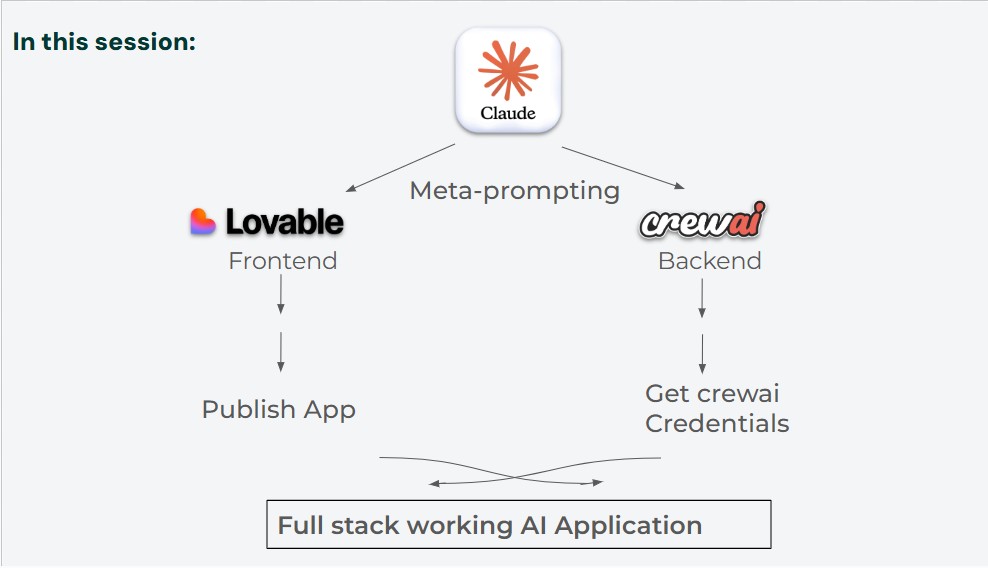
The Architecture: Three Tools, Zero Code
The application uses three platforms, each handling a distinct layer of the stack:
ClaudeClaude — Meta-Prompting
Lovable — Frontend UI
CrewAI — Backend Agents
Claude acts as the architect — you describe what you want, and it generates separate, optimized prompts for Lovable (to build the interface) and CrewAI (to build the evaluation engine). You then paste each prompt into its respective platform, connect the two with API credentials, and you have a working application.
Step-by-Step Walkthrough
Step 1: Meta-Prompt with Claude
Start in Claude with a single, structured prompt that describes your candidate evaluation app — features, constraints, and how the frontend and backend should interact. Claude returns two ready-to-paste prompts: one for Lovable, one for CrewAI.
Task: Generate 2 separate prompts — one for Lovable (frontend/UI) and one for CrewAI(backend/processing).
Context: Build a candidate evaluation app that:
Allows users to paste a job description OR generate one with AI
Accepts multiple resumes via copy-paste
Sends data to CrewAI for evaluation
Returns scores for skills, experience, professionalism, potential, and authenticity
Step 2: Build the Frontend in Lovable
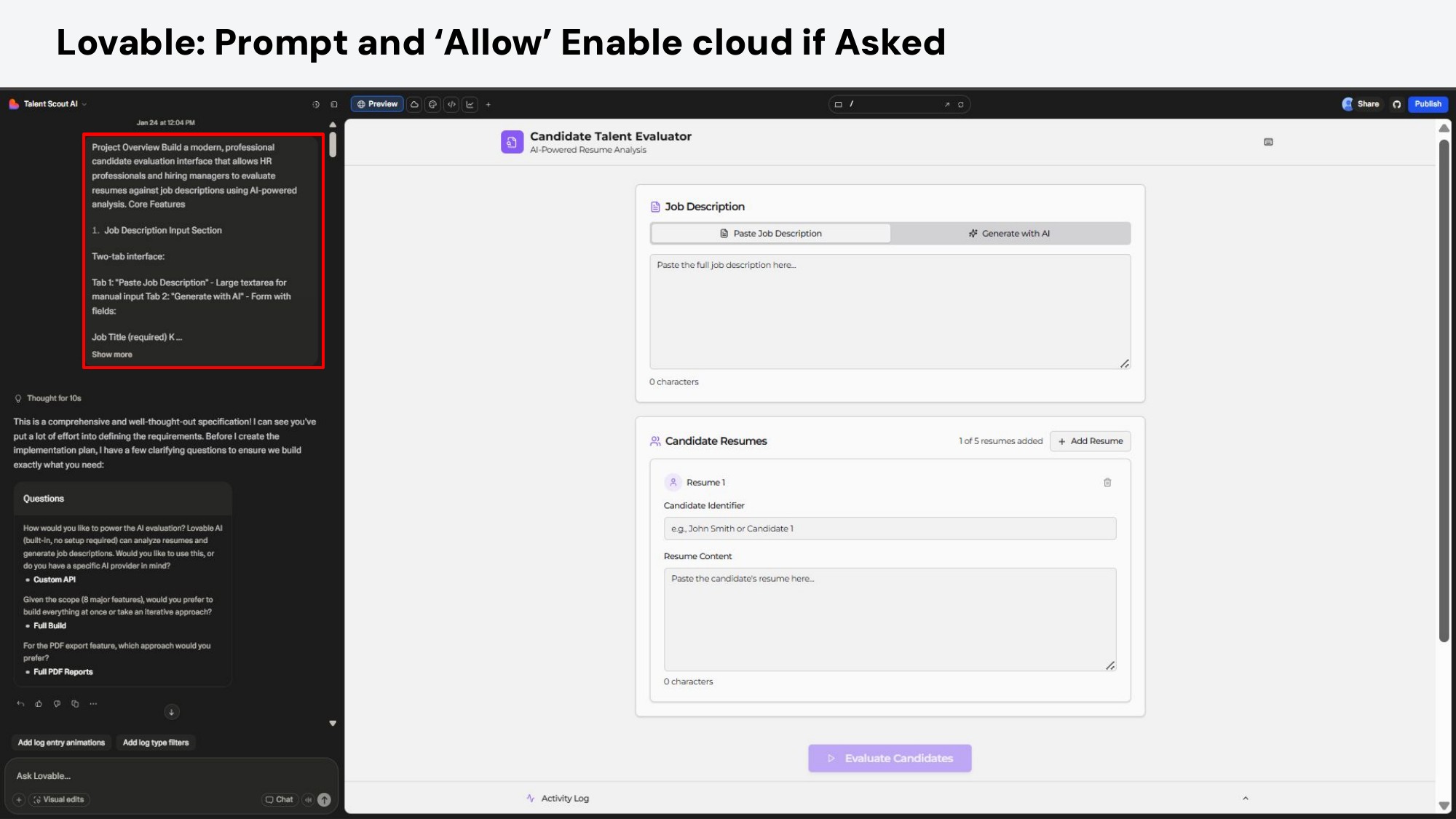
Paste Claude’s Lovable prompt into lovable.dev. Within minutes, you get a polished candidate evaluation interface with a job description input (paste or AI-generate), resume cards for up to 5 candidates, an “Evaluate Candidates” button, and a debug console.
Lovable builds the full frontend from a single prompt — complete with tabbed inputs and resume cards
Step 3: Build the AI Agents in CrewAI
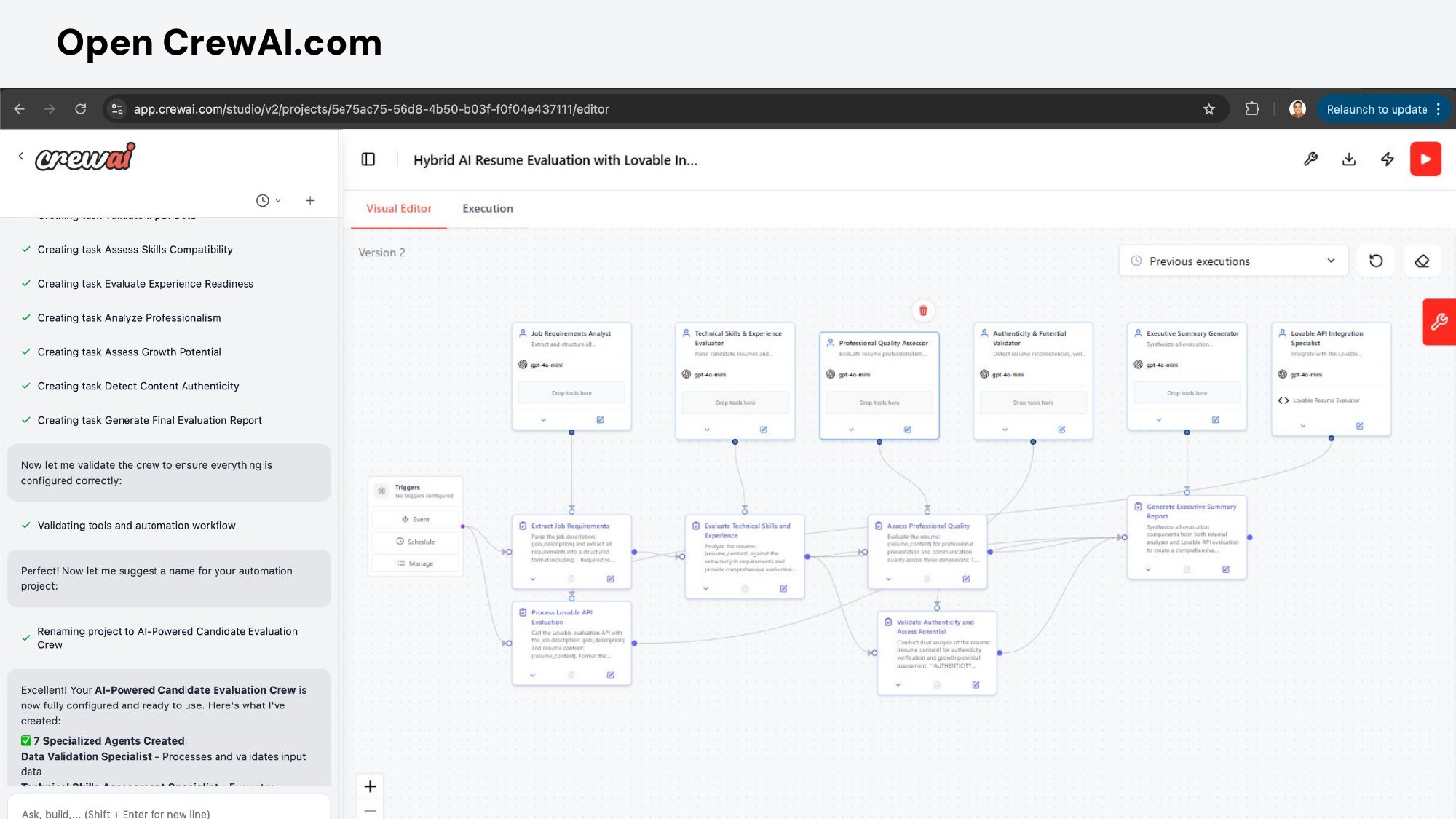
Paste Claude’s CrewAI prompt into CrewAI Studio. It generates a multi-agent system with 5 specialized agents: a Requirements Parser, Skills Evaluator, Professional Quality Assessor, Authenticity Validator, and Executive Summary Generator. Run a test, then publish the automation.
CrewAI's visual editor showing the 5-agent evaluation pipeline
Step 4:
Connect Frontend ↔ Backend
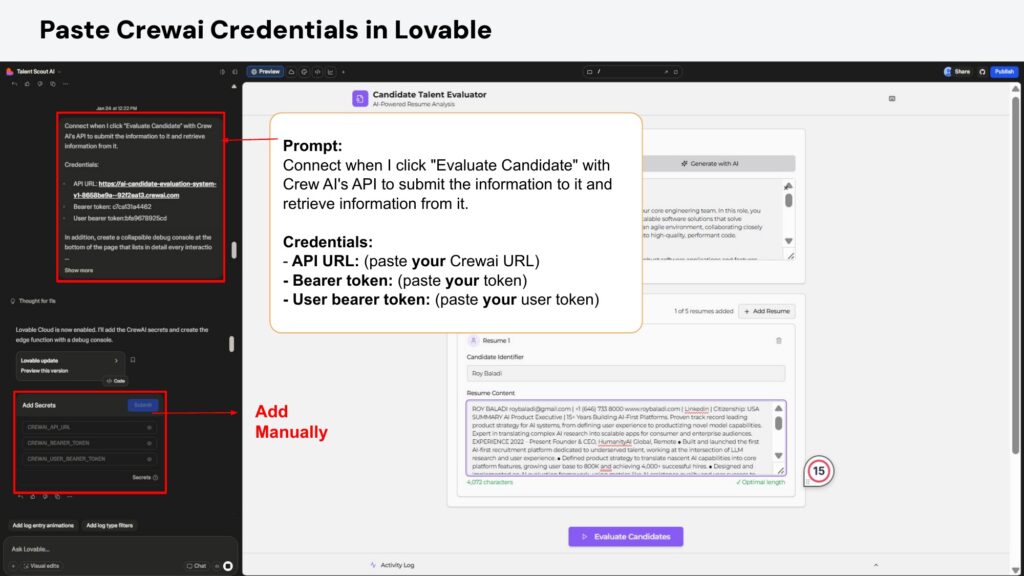
Copy the API URL and Bearer Token from CrewAI’s Automations panel and paste them into Lovable. This follows a one-way connection pattern that lets the “Evaluate Candidates” button trigger the full agent pipeline and display results.
Connecting the two platforms with API credentials — the final wiring step
Step 5:
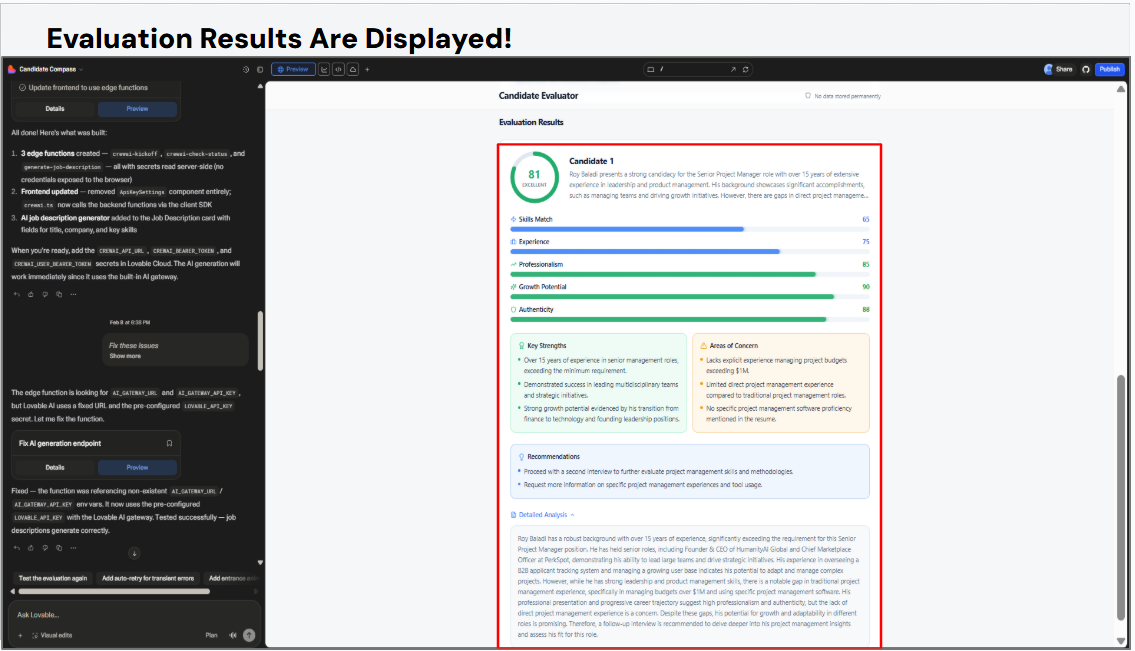
Evaluate and See Results
Click “Evaluate Candidates.” The debug console shows real-time progress as each agent processes the data. Within about 90 seconds, you get a full evaluation: scored metrics, an executive summary, key strengths, and areas of concern for each candidate.
The finished product — a polished evaluation card with radial score, progress bars, and detailed analysis
What the AI Agents Actually Do
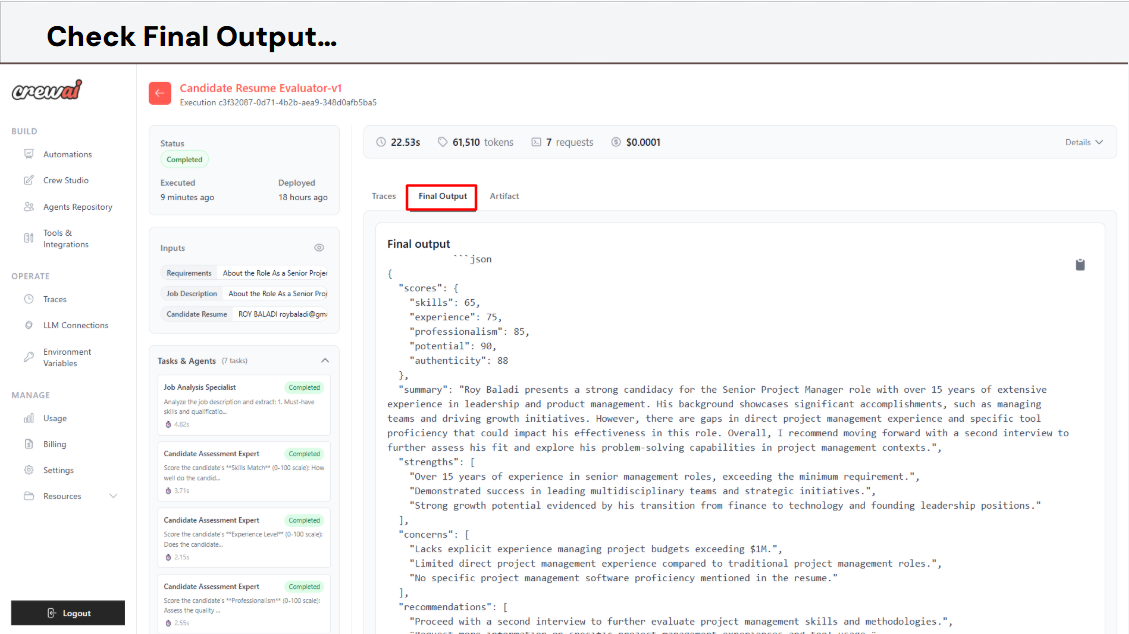
Behind the button click, five agents work in sequence. The first parses the job description into structured requirements and extracts candidate profiles from the resumes. The second scores each candidate’s technical skills and experience relevance against those requirements. The third evaluates professionalism — resume formatting, communication quality, and presentation. The fourth checks for authenticity, looking for inconsistencies, timeline gaps, or inflated claims. The fifth synthesizes everything into a scored report with a hiring recommendation. You can view the final JSON output after the execution, which reflects the evaluation results displayed on Lovable.
CrewAI's final output — structured JSON with scores across all evaluation dimensions
Key takeaway: The entire system — frontend, backend, multi-agent AI pipeline — was built using natural language prompts. No code was written. No dependencies were installed. The “programming language” was English.
Why This Matters
This isn’t just a demo. It’s a preview of how business applications will be built. The shift from traditional AI (ask a question, get an answer) to agentic AI (set a goal, AI plans and executes) means that non-technical teams can now build sophisticated tools that would have previously required a development team and weeks of work.
For HR specifically, this kind of tool removes the bottleneck of manual resume screening while providing structured, consistent evaluations that reduce bias and save hours per role.
Want to Build Your Own AI Agent?
Kanz runs hands-on Agentic AI workshops for teams and organizations across the region.
I’m Syeda Hajera, a Biotechnology graduate and AI practitioner with expertise in laboratory sciences and intelligent systems.
Through Kanz’s Agentic AI program, I built a no-code healthcare application that automates medical triage and appointment scheduling — reducing risk and improving patient outcomes.
I currently serve as an AI Instructor and am building an AI-powered salary benchmarking and workforce planning platform.
We use cookies to ensure that we give you the best experience on our website. If you continue to use this site we will assume that you are happy with it.

 العربية
  English